



Codeby Academy
Практика и мастерство
От основ до продвинутого — программы для практиков Codeby.
К курсу →
все понялНет, сейчас они у тебя в блоке if!
Свои алиасы запиши в конец файла.
закрывай, перезапускай консоль и пробуй запустить theharvester
# enable color support of ls and also add handy aliases
if [ -x /usr/bin/dircolors ]; then
test -r ~/.dircolors && eval "$(dircolors -b ~/.dircolors)" || eval "$(dircolors -b)"
alias python='python3'
alias pip='pip3'
alias ls='ls --color=auto'
#alias dir='dir --color=auto'
#alias vdir='vdir --color=auto'
#alias grep='grep --color=auto'
#alias fgrep='fgrep --color=auto'
#alias egrep='egrep --color=auto'
fi
# some more ls aliases
#alias ll='ls -l'
#alias la='ls -A'
#alias l='ls -CF'
alias python='python3'
alias pip='pip3'
# Alias definitions.
# You may want to put all your additions into a separate file like
# ~/.bash_aliases, instead of adding them here directly.
# See /usr/share/doc/bash-doc/examples in the bash-doc package.
if [ -f ~/.bash_aliases ]; then
. ~/.bash_aliases
fi
# enable programmable completion features (you don't need to enable
# this, if it's already enabled in /etc/bash.bashrc and /etc/profile
# sources /etc/bash.bashrc).
if ! shopt -oq posix; then
if [ -f /usr/share/bash-completion/bash_completion ]; then
. /usr/share/bash-completion/bash_completion
elif [ -f /etc/bash_completion ]; then
. /etc/bash_completion
Вот я удалил их с первой строки просто скопировал тупо ......
if [ -x /usr/bin/dircolors ]; then
test -r ~/.dircolors && eval "$(dircolors -b ~/.dircolors)" || eval "$(dircolors -b)"
alias python='python3'
alias pip='pip3'
alias ls='ls --color=auto'
#alias dir='dir --color=auto'
#alias vdir='vdir --color=auto'
#alias grep='grep --color=auto'
#alias fgrep='fgrep --color=auto'
#alias egrep='egrep --color=auto'
fi
# some more ls aliases
#alias ll='ls -l'
#alias la='ls -A'
#alias l='ls -CF'
alias python='python3'
alias pip='pip3'
# Alias definitions.
# You may want to put all your additions into a separate file like
# ~/.bash_aliases, instead of adding them here directly.
# See /usr/share/doc/bash-doc/examples in the bash-doc package.
if [ -f ~/.bash_aliases ]; then
. ~/.bash_aliases
fi
# enable programmable completion features (you don't need to enable
# this, if it's already enabled in /etc/bash.bashrc and /etc/profile
# sources /etc/bash.bashrc).
if ! shopt -oq posix; then
if [ -f /usr/share/bash-completion/bash_completion ]; then
. /usr/share/bash-completion/bash_completion
elif [ -f /etc/bash_completion ]; then
. /etc/bash_completion
Вот я удалил их с первой строки просто скопировал тупо ......
# enable color support of ls and also add handy aliases
if [ -x /usr/bin/dircolors ]; then
test -r ~/.dircolors && eval "$(dircolors -b ~/.dircolors)" || eval "$(dircolors -b)
alias ls='ls --color=auto'
#alias dir='dir --color=auto'
#alias vdir='vdir --color=auto'
#alias grep='grep --color=auto'
#alias fgrep='fgrep --color=auto'
#alias egrep='egrep --color=auto'
fi
# some more ls aliases
#alias ll='ls -l'
#alias la='ls -A'
#alias l='ls -CF'
alias python='python3'
alias pip='pip3'
# Alias definitions.
# You may want to put all your additions into a separate file like
# ~/.bash_aliases, instead of adding them here directly.
# See /usr/share/doc/bash-doc/examples in the bash-doc package.
if [ -f ~/.bash_aliases ]; then
. ~/.bash_aliases
fi
# enable programmable completion features (you don't need to enable
# this, if it's already enabled in /etc/bash.bashrc and /etc/profile
# sources /etc/bash.bashrc).
if ! shopt -oq posix; then
if [ -f /usr/share/bash-completion/bash_completion ]; then
. /usr/share/bash-completion/bash_completion
elif [ -f /etc/bash_completion ]; then
. /etc/bash_completion
fi
fi
ВОТ
if [ -x /usr/bin/dircolors ]; then
test -r ~/.dircolors && eval "$(dircolors -b ~/.dircolors)" || eval "$(dircolors -b)
alias ls='ls --color=auto'
#alias dir='dir --color=auto'
#alias vdir='vdir --color=auto'
#alias grep='grep --color=auto'
#alias fgrep='fgrep --color=auto'
#alias egrep='egrep --color=auto'
fi
# some more ls aliases
#alias ll='ls -l'
#alias la='ls -A'
#alias l='ls -CF'
alias python='python3'
alias pip='pip3'
# Alias definitions.
# You may want to put all your additions into a separate file like
# ~/.bash_aliases, instead of adding them here directly.
# See /usr/share/doc/bash-doc/examples in the bash-doc package.
if [ -f ~/.bash_aliases ]; then
. ~/.bash_aliases
fi
# enable programmable completion features (you don't need to enable
# this, if it's already enabled in /etc/bash.bashrc and /etc/profile
# sources /etc/bash.bashrc).
if ! shopt -oq posix; then
if [ -f /usr/share/bash-completion/bash_completion ]; then
. /usr/share/bash-completion/bash_completion
elif [ -f /etc/bash_completion ]; then
. /etc/bash_completion
fi
fi
ВОТ

У меня теперь перед открытием терминала вот такая дичь
bash: /home/Warlock/.bashrc: line 77: unexpected EOF while looking for matching `"'
bash: /home/Warlock/.bashrc: line 114: syntax error: unexpected end of file
Точнее когда открыл уже
bash: /home/Warlock/.bashrc: line 77: unexpected EOF while looking for matching `"'
bash: /home/Warlock/.bashrc: line 114: syntax error: unexpected end of file
Точнее когда открыл уже
На строке 77 или выше удалил лишнюю кавычку или апостроф.У меня теперь перед открытием терминала вот такая дичь
bash: /home/Warlock/.bashrc: line 77: unexpected EOF while looking for matching `"'
bash: /home/Warlock/.bashrc: line 114: syntax error: unexpected end of file
Все они должны быть парными.
Вторая ошибка говорит о том, что удалил где-то закрывающийся тег fi
Каждое условие в этом файле должно начинаться на if и заканчиваться на fi
Покажи весь файл
cat -n ~/.bashrcТолько под спойлер засунь
1 # ~/.bashrc: executed by bash(1) for non-login shells.
2 # see /usr/share/doc/bash/examples/startup-files (in the package bash-doc)
3 # for examples
4
5 # If not running interactively, don't do anything
6 case $- in
7 *i*) ;;
8 *) return;;
9 esac
10
11 # don't put duplicate lines or lines starting with space in the history.
12 # See bash(1) for more options
13 HISTCONTROL=ignoreboth
14
15 # append to the history file, don't overwrite it
16 shopt -s histappend
17
18 # for setting history length see HISTSIZE and HISTFILESIZE in bash(1)
19 HISTSIZE=1000
20 HISTFILESIZE=2000
21
22 # check the window size after each command and, if necessary,
23 # update the values of LINES and COLUMNS.
24 shopt -s checkwinsize
25
26 # If set, the pattern "**" used in a pathname expansion context will
27 # match all files and zero or more directories and subdirectories.
28 #shopt -s globstar
29
30 # make less more friendly for non-text input files, see lesspipe(1)
31 #[ -x /usr/bin/lesspipe ] && eval "$(SHELL=/bin/sh lesspipe)"
32
33 # set variable identifying the chroot you work in (used in the prompt below)
34 if [ -z "${debian_chroot:-}" ] && [ -r /etc/debian_chroot ]; then
35 debian_chroot=$(cat /etc/debian_chroot)
36 fi
37
38 # set a fancy prompt (non-color, unless we know we "want" color)
39 case "$TERM" in
40 xterm-color) color_prompt=yes;;
41 esac
42
43 # uncomment for a colored prompt, if the terminal has the capability; turned
44 # off by default to not distract the user: the focus in a terminal window
45 # should be on the output of commands, not on the prompt
46 force_color_prompt=yes
47
48 if [ -n "$force_color_prompt" ]; then
49 if [ -x /usr/bin/tput ] && tput setaf 1 >&/dev/null; then
50 # We have color support; assume it's compliant with Ecma-48
51 # (ISO/IEC-6429). (Lack of such support is extremely rare, and such
52 # a case would tend to support setf rather than setaf.)
53 color_prompt=yes
54 else
55 color_prompt=
56 fi
57 fi
58
59 if [ "$color_prompt" = yes ]; then
60 PS1='${debian_chroot:+($debian_chroot)}\[\033[01;31m\]\u@\h\[\033[00m\]:\[\033[01;34m\]\w\[\033[00m\]\$ '
61 else
62 PS1='${debian_chroot:+($debian_chroot)}\u@\h:\w\$ '
63 fi
64 unset color_prompt force_color_prompt
65
66 # If this is an xterm set the title to user@host:dir
67 case "$TERM" in
68 xterm*|rxvt*)
69 PS1="\[\e]0;${debian_chroot:+($debian_chroot)}\u@\h: \w\a\]$PS1"
70 ;;
71 *)
72 ;;
73 esac
74
75 # enable color support of ls and also add handy aliases
76 if [ -x /usr/bin/dircolors ]; then
77 test -r ~/.dircolors && eval "$(dircolors -b ~/.dircolors)" || eval "$(dircolors -b)"
78 alias ls='ls --color=auto'
79 #alias dir='dir --color=auto'
80 #alias vdir='vdir --color=auto'
81
82 #alias grep='grep --color=auto'
83 #alias fgrep='fgrep --color=auto'
84 #alias egrep='egrep --color=auto'
85 fi
86
87 # some more ls aliases
88 #alias ll='ls -l'
89 #alias la='ls -A'
90 #alias l='ls -CF'
91
92 # Alias definitions.
93 # You may want to put all your additions into a separate file like
94 # ~/.bash_aliases, instead of adding them here directly.
95 # See /usr/share/doc/bash-doc/examples in the bash-doc package.
96
97 if [ -f ~/.bash_aliases ]; then
98 . ~/.bash_aliases
99 fi
100
101 # enable programmable completion features (you don't need to enable
102 # this, if it's already enabled in /etc/bash.bashrc and /etc/profile
103 # sources /etc/bash.bashrc).
104 if ! shopt -oq posix; then
105 if [ -f /usr/share/bash-completion/bash_completion ]; then
106 . /usr/share/bash-completion/bash_completion
107 elif [ -f /etc/bash_completion ]; then
108 . /etc/bash_completion
109 fi
110 fi
2 # see /usr/share/doc/bash/examples/startup-files (in the package bash-doc)
3 # for examples
4
5 # If not running interactively, don't do anything
6 case $- in
7 *i*) ;;
8 *) return;;
9 esac
10
11 # don't put duplicate lines or lines starting with space in the history.
12 # See bash(1) for more options
13 HISTCONTROL=ignoreboth
14
15 # append to the history file, don't overwrite it
16 shopt -s histappend
17
18 # for setting history length see HISTSIZE and HISTFILESIZE in bash(1)
19 HISTSIZE=1000
20 HISTFILESIZE=2000
21
22 # check the window size after each command and, if necessary,
23 # update the values of LINES and COLUMNS.
24 shopt -s checkwinsize
25
26 # If set, the pattern "**" used in a pathname expansion context will
27 # match all files and zero or more directories and subdirectories.
28 #shopt -s globstar
29
30 # make less more friendly for non-text input files, see lesspipe(1)
31 #[ -x /usr/bin/lesspipe ] && eval "$(SHELL=/bin/sh lesspipe)"
32
33 # set variable identifying the chroot you work in (used in the prompt below)
34 if [ -z "${debian_chroot:-}" ] && [ -r /etc/debian_chroot ]; then
35 debian_chroot=$(cat /etc/debian_chroot)
36 fi
37
38 # set a fancy prompt (non-color, unless we know we "want" color)
39 case "$TERM" in
40 xterm-color) color_prompt=yes;;
41 esac
42
43 # uncomment for a colored prompt, if the terminal has the capability; turned
44 # off by default to not distract the user: the focus in a terminal window
45 # should be on the output of commands, not on the prompt
46 force_color_prompt=yes
47
48 if [ -n "$force_color_prompt" ]; then
49 if [ -x /usr/bin/tput ] && tput setaf 1 >&/dev/null; then
50 # We have color support; assume it's compliant with Ecma-48
51 # (ISO/IEC-6429). (Lack of such support is extremely rare, and such
52 # a case would tend to support setf rather than setaf.)
53 color_prompt=yes
54 else
55 color_prompt=
56 fi
57 fi
58
59 if [ "$color_prompt" = yes ]; then
60 PS1='${debian_chroot:+($debian_chroot)}\[\033[01;31m\]\u@\h\[\033[00m\]:\[\033[01;34m\]\w\[\033[00m\]\$ '
61 else
62 PS1='${debian_chroot:+($debian_chroot)}\u@\h:\w\$ '
63 fi
64 unset color_prompt force_color_prompt
65
66 # If this is an xterm set the title to user@host:dir
67 case "$TERM" in
68 xterm*|rxvt*)
69 PS1="\[\e]0;${debian_chroot:+($debian_chroot)}\u@\h: \w\a\]$PS1"
70 ;;
71 *)
72 ;;
73 esac
74
75 # enable color support of ls and also add handy aliases
76 if [ -x /usr/bin/dircolors ]; then
77 test -r ~/.dircolors && eval "$(dircolors -b ~/.dircolors)" || eval "$(dircolors -b)"
78 alias ls='ls --color=auto'
79 #alias dir='dir --color=auto'
80 #alias vdir='vdir --color=auto'
81
82 #alias grep='grep --color=auto'
83 #alias fgrep='fgrep --color=auto'
84 #alias egrep='egrep --color=auto'
85 fi
86
87 # some more ls aliases
88 #alias ll='ls -l'
89 #alias la='ls -A'
90 #alias l='ls -CF'
91
92 # Alias definitions.
93 # You may want to put all your additions into a separate file like
94 # ~/.bash_aliases, instead of adding them here directly.
95 # See /usr/share/doc/bash-doc/examples in the bash-doc package.
96
97 if [ -f ~/.bash_aliases ]; then
98 . ~/.bash_aliases
99 fi
100
101 # enable programmable completion features (you don't need to enable
102 # this, if it's already enabled in /etc/bash.bashrc and /etc/profile
103 # sources /etc/bash.bashrc).
104 if ! shopt -oq posix; then
105 if [ -f /usr/share/bash-completion/bash_completion ]; then
106 . /usr/share/bash-completion/bash_completion
107 elif [ -f /etc/bash_completion ]; then
108 . /etc/bash_completion
109 fi
110 fi
root@kali:/home/Warlock# python -V
Python 2.7.17
Вот о чем я и говорил поставил самый новый питон 3.8.0 в итоге я хз что это такое.
Python 2.7.17
Вот о чем я и говорил поставил самый новый питон 3.8.0 в итоге я хз что это такое.
1 # ~/.bashrc: executed by bash(1) for non-login shells.
2 # see /usr/share/doc/bash/examples/startup-files (in the package bash-doc)
3 # for examples
4
5 # If not running interactively, don't do anything
6 case $- in
7 *i*) ;;
8 *) return;;
9 esac
10
11 # don't put duplicate lines or lines starting with space in the history.
12 # See bash(1) for more options
13 HISTCONTROL=ignoreboth
14
15 # append to the history file, don't overwrite it
16 shopt -s histappend
17
18 # for setting history length see HISTSIZE and HISTFILESIZE in bash(1)
19 HISTSIZE=1000
20 HISTFILESIZE=2000
21
22 # check the window size after each command and, if necessary,
23 # update the values of LINES and COLUMNS.
24 shopt -s checkwinsize
25
26 # If set, the pattern "**" used in a pathname expansion context will
27 # match all files and zero or more directories and subdirectories.
28 #shopt -s globstar
29
30 # make less more friendly for non-text input files, see lesspipe(1)
31 #[ -x /usr/bin/lesspipe ] && eval "$(SHELL=/bin/sh lesspipe)"
32
33 # set variable identifying the chroot you work in (used in the prompt below)
34 if [ -z "${debian_chroot:-}" ] && [ -r /etc/debian_chroot ]; then
35 debian_chroot=$(cat /etc/debian_chroot)
36 fi
37
38 # set a fancy prompt (non-color, unless we know we "want" color)
39 case "$TERM" in
40 xterm-color) color_prompt=yes;;
41 esac
42
43 # uncomment for a colored prompt, if the terminal has the capability; turned
44 # off by default to not distract the user: the focus in a terminal window
45 # should be on the output of commands, not on the prompt
46 force_color_prompt=yes
47
48 if [ -n "$force_color_prompt" ]; then
49 if [ -x /usr/bin/tput ] && tput setaf 1 >&/dev/null; then
50 # We have color support; assume it's compliant with Ecma-48
51 # (ISO/IEC-6429). (Lack of such support is extremely rare, and such
52 # a case would tend to support setf rather than setaf.)
53 color_prompt=yes
54 else
55 color_prompt=
56 fi
57 fi
58
59 if [ "$color_prompt" = yes ]; then
60 PS1='${debian_chroot:+($debian_chroot)}\[\033[01;31m\]\u@\h\[\033[00m\]:\[\033[01;34m\]\w\[\033[00m\]\$ '
61 else
62 PS1='${debian_chroot:+($debian_chroot)}\u@\h:\w\$ '
63 fi
64 unset color_prompt force_color_prompt
65
66 # If this is an xterm set the title to user@host:dir
67 case "$TERM" in
68 xterm*|rxvt*)
69 PS1="\[\e]0;${debian_chroot:+($debian_chroot)}\u@\h: \w\a\]$PS1"
70 ;;
71 *)
72 ;;
73 esac
74
75 # enable color support of ls and also add handy aliases
76 if [ -x /usr/bin/dircolors ]; then
77 test -r ~/.dircolors && eval "$(dircolors -b ~/.dircolors)" || eval "$(dircolors -b)"
78 alias ls='ls --color=auto'
79 #alias dir='dir --color=auto'
80 #alias vdir='vdir --color=auto'
81
82 #alias grep='grep --color=auto'
83 #alias fgrep='fgrep --color=auto'
84 #alias egrep='egrep --color=auto'
85 fi
86
87 # some more ls aliases
88 #alias ll='ls -l'
89 #alias la='ls -A'
90 #alias l='ls -CF'
91
92 # Alias definitions.
93 # You may want to put all your additions into a separate file like
94 # ~/.bash_aliases, instead of adding them here directly.
95 # See /usr/share/doc/bash-doc/examples in the bash-doc package.
96
97 if [ -f ~/.bash_aliases ]; then
98 . ~/.bash_aliases
99 fi
100
101 # enable programmable completion features (you don't need to enable
102 # this, if it's already enabled in /etc/bash.bashrc and /etc/profile
103 # sources /etc/bash.bashrc).
104 if ! shopt -oq posix; then
105 if [ -f /usr/share/bash-completion/bash_completion ]; then
106 . /usr/share/bash-completion/bash_completion
107 elif [ -f /etc/bash_completion ]; then
108 . /etc/bash_completion
109 fi
110 fi
Скопируй вместо старого
# ~/.bashrc: executed by bash(1) for non-login shells.
# see /usr/share/doc/bash/examples/startup-files (in the package bash-doc)
# for examples
# If not running interactively, don't do anything
case $- in
*i*) ;;
*) return;;
esac
# don't put duplicate lines or lines starting with space in the history.
# See bash(1) for more options
HISTCONTROL=ignoreboth
# append to the history file, don't overwrite it
shopt -s histappend
# for setting history length see HISTSIZE and HISTFILESIZE in bash(1)
HISTSIZE=1000
HISTFILESIZE=2000
# check the window size after each command and, if necessary,
# update the values of LINES and COLUMNS.
shopt -s checkwinsize
# If set, the pattern "**" used in a pathname expansion context will
# match all files and zero or more directories and subdirectories.
#shopt -s globstar
# make less more friendly for non-text input files, see lesspipe(1)
[ -x /usr/bin/lesspipe ] && eval "$(SHELL=/bin/sh lesspipe)"
# set variable identifying the chroot you work in (used in the prompt below)
if [ -z "${debian_chroot:-}" ] && [ -r /etc/debian_chroot ]; then
debian_chroot=$(cat /etc/debian_chroot)
fi
# set a fancy prompt (non-color, unless we know we "want" color)
case "$TERM" in
xterm-color) color_prompt=yes;;
esac
# uncomment for a colored prompt, if the terminal has the capability; turned
# off by default to not distract the user: the focus in a terminal window
# should be on the output of commands, not on the prompt
#force_color_prompt=yes
if [ -n "$force_color_prompt" ]; then
if [ -x /usr/bin/tput ] && tput setaf 1 >&/dev/null; then
# We have color support; assume it's compliant with Ecma-48
# (ISO/IEC-6429). (Lack of such support is extremely rare, and such
# a case would tend to support setf rather than setaf.)
color_prompt=yes
else
color_prompt=
fi
fi
if [ "$color_prompt" = yes ]; then
PS1='${debian_chroot:+($debian_chroot)}\[\033[01;32m\]\u@\h\[\033[00m\]:\[\033[01;34m\]\w\[\033[00m\]\$ '
else
PS1='${debian_chroot:+($debian_chroot)}\u@\h:\w\$ '
fi
unset color_prompt force_color_prompt
# If this is an xterm set the title to user@host:dir
case "$TERM" in
xterm*|rxvt*)
PS1="\[\e]0;${debian_chroot:+($debian_chroot)}\u@\h: \w\a\]$PS1"
;;
*)
;;
esac
# enable color support of ls and also add handy aliases
if [ -x /usr/bin/dircolors ]; then
test -r ~/.dircolors && eval "$(dircolors -b ~/.dircolors)" || eval "$(dircolors -b)"
alias ls='ls --color=auto'
#alias dir='dir --color=auto'
#alias vdir='vdir --color=auto'
alias grep='grep --color=auto'
alias fgrep='fgrep --color=auto'
alias egrep='egrep --color=auto'
fi
# some more ls aliases
alias ll='ls -alF'
alias la='ls -A'
alias l='ls -CF'
# Add an "alert" alias for long running commands. Use like so:
# sleep 10; alert
alias alert='notify-send --urgency=low -i "$([ $? = 0 ] && echo terminal || echo error)" "$(history|tail -n1|sed -e '\''s/^\s*[0-9]\+\s*//;s/[;&|]\s*alert$//'\'')"'
# Alias definitions.
# You may want to put all your additions into a separate file like
# ~/.bash_aliases, instead of adding them here directly.
# See /usr/share/doc/bash-doc/examples in the bash-doc package.
if [ -f ~/.bash_aliases ]; then
. ~/.bash_aliases
fi
# enable programmable completion features (you don't need to enable
# this, if it's already enabled in /etc/bash.bashrc and /etc/profile
# sources /etc/bash.bashrc).
if ! shopt -oq posix; then
if [ -f /usr/share/bash-completion/bash_completion ]; then
. /usr/share/bash-completion/bash_completion
elif [ -f /etc/bash_completion ]; then
. /etc/bash_completion
fi
fi
alias pip='pip3'
alias python='python3'
# see /usr/share/doc/bash/examples/startup-files (in the package bash-doc)
# for examples
# If not running interactively, don't do anything
case $- in
*i*) ;;
*) return;;
esac
# don't put duplicate lines or lines starting with space in the history.
# See bash(1) for more options
HISTCONTROL=ignoreboth
# append to the history file, don't overwrite it
shopt -s histappend
# for setting history length see HISTSIZE and HISTFILESIZE in bash(1)
HISTSIZE=1000
HISTFILESIZE=2000
# check the window size after each command and, if necessary,
# update the values of LINES and COLUMNS.
shopt -s checkwinsize
# If set, the pattern "**" used in a pathname expansion context will
# match all files and zero or more directories and subdirectories.
#shopt -s globstar
# make less more friendly for non-text input files, see lesspipe(1)
[ -x /usr/bin/lesspipe ] && eval "$(SHELL=/bin/sh lesspipe)"
# set variable identifying the chroot you work in (used in the prompt below)
if [ -z "${debian_chroot:-}" ] && [ -r /etc/debian_chroot ]; then
debian_chroot=$(cat /etc/debian_chroot)
fi
# set a fancy prompt (non-color, unless we know we "want" color)
case "$TERM" in
xterm-color) color_prompt=yes;;
esac
# uncomment for a colored prompt, if the terminal has the capability; turned
# off by default to not distract the user: the focus in a terminal window
# should be on the output of commands, not on the prompt
#force_color_prompt=yes
if [ -n "$force_color_prompt" ]; then
if [ -x /usr/bin/tput ] && tput setaf 1 >&/dev/null; then
# We have color support; assume it's compliant with Ecma-48
# (ISO/IEC-6429). (Lack of such support is extremely rare, and such
# a case would tend to support setf rather than setaf.)
color_prompt=yes
else
color_prompt=
fi
fi
if [ "$color_prompt" = yes ]; then
PS1='${debian_chroot:+($debian_chroot)}\[\033[01;32m\]\u@\h\[\033[00m\]:\[\033[01;34m\]\w\[\033[00m\]\$ '
else
PS1='${debian_chroot:+($debian_chroot)}\u@\h:\w\$ '
fi
unset color_prompt force_color_prompt
# If this is an xterm set the title to user@host:dir
case "$TERM" in
xterm*|rxvt*)
PS1="\[\e]0;${debian_chroot:+($debian_chroot)}\u@\h: \w\a\]$PS1"
;;
*)
;;
esac
# enable color support of ls and also add handy aliases
if [ -x /usr/bin/dircolors ]; then
test -r ~/.dircolors && eval "$(dircolors -b ~/.dircolors)" || eval "$(dircolors -b)"
alias ls='ls --color=auto'
#alias dir='dir --color=auto'
#alias vdir='vdir --color=auto'
alias grep='grep --color=auto'
alias fgrep='fgrep --color=auto'
alias egrep='egrep --color=auto'
fi
# some more ls aliases
alias ll='ls -alF'
alias la='ls -A'
alias l='ls -CF'
# Add an "alert" alias for long running commands. Use like so:
# sleep 10; alert
alias alert='notify-send --urgency=low -i "$([ $? = 0 ] && echo terminal || echo error)" "$(history|tail -n1|sed -e '\''s/^\s*[0-9]\+\s*//;s/[;&|]\s*alert$//'\'')"'
# Alias definitions.
# You may want to put all your additions into a separate file like
# ~/.bash_aliases, instead of adding them here directly.
# See /usr/share/doc/bash-doc/examples in the bash-doc package.
if [ -f ~/.bash_aliases ]; then
. ~/.bash_aliases
fi
# enable programmable completion features (you don't need to enable
# this, if it's already enabled in /etc/bash.bashrc and /etc/profile
# sources /etc/bash.bashrc).
if ! shopt -oq posix; then
if [ -f /usr/share/bash-completion/bash_completion ]; then
. /usr/share/bash-completion/bash_completion
elif [ -f /etc/bash_completion ]; then
. /etc/bash_completion
fi
fi
alias pip='pip3'
alias python='python3'
Так все хорошо, но вот что делать с питоном как думаете?
просто нереаьно обновить язык бл.
просто нереаьно обновить язык бл.
Так в конце файла alias'ы записаны.Так все хорошо, но вот что делать с питоном как думаете?
просто нереаьно обновить язык бл.
Что сейчас
python -V выдаёт?
А командаarlock@kali:~$ python -V
Python 2.7.17
/usr/bin/python3 -VААААААААААААААА господи я думал что вы мне кинули отредактиктированый фаел уже с алиасами
все нормально показвает новую версиюААААААААААААААА господи я думал что вы мне кинули отредактиктированый фаел уже с алиасами
все нормально показвает новую версию
Теперь открывай ту папку,
в которую скачал theharvester и запускай
/usr/local/bin/pip3.7 install -r requirements.txt
/usr/bin/python3 setup.py install
Если ты обвсе нормально показвает новую версию
/usr/bin/python3 -V Тогда в файле .bashrc
последние 2 строки измени на
alias python='/usr/bin/python3'
alias pip='/usr/local/bin/pip3.7'Ладно не буду больше вас мучить ОГРОМНЕЙШЕЕ СПАСИБО за то,что научили не то чтобы новичка, но плавающего в этих всех конфигах)) а этот харвестер,я думаю что это прога в новых версиях кали багнута или что-то в этом роде.
Что конкретно не получилось?Ладно не буду больше вас мучить ОГРОМНЕЙШЕЕ СПАСИБО за то,что научили не то чтобы новичка, но плавающего в этих всех конфигах)) а этот харвестер,я думаю что это прога в новых версиях кали багнута или что-то в этом роде.
Только что установилась с git'a
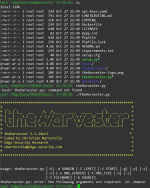
Я вписал эти команды,а там писало что нет такой директории. За-то я понял как мне sqlmap настроить! Еще раз спасибоЧто конкретно не получилось?
Ещё по теме
4 СтатьяtheHarvester — инструмент разведки: от выбора источников до карты внешней поверхности атаки
Сергей Попов·27.06.2026·Арсенал специалиста по ИБ
0
805
27.06.2026
СтатьяtheHarvester — инструмент разведки: от выбора источников до карты внешней поверхности атаки
Сергей Попов·27.06.2026·Арсенал специалиста по ИБ
0
805
27.06.2026
 СтатьяtheHarvester
qwerty120·03.07.2025·OSINT и Форензика
0
7 тыс.
03.07.2025
СтатьяSpiderFoot на Windows: установка, настройка и OSINT-разведка без Kali Linux
Сергей Попов·22.07.2026·Анализ уязвимостей и исследования
0
1 тыс.
22.07.2026
СтатьяНастройка Kali Linux для пентеста: кастомизация, инструменты и оптимизация окружения
Сергей Попов·30.04.2026·Арсенал специалиста по ИБ
1
4 тыс.
07.05.2026
СтатьяtheHarvester
qwerty120·03.07.2025·OSINT и Форензика
0
7 тыс.
03.07.2025
СтатьяSpiderFoot на Windows: установка, настройка и OSINT-разведка без Kali Linux
Сергей Попов·22.07.2026·Анализ уязвимостей и исследования
0
1 тыс.
22.07.2026
СтатьяНастройка Kali Linux для пентеста: кастомизация, инструменты и оптимизация окружения
Сергей Попов·30.04.2026·Арсенал специалиста по ИБ
1
4 тыс.
07.05.2026
Поделиться: